Mostplay Registration in Bangladesh - Sign Up Guide
Mostplay in Bangladesh is set up for quick access and BDT play, but a few small steps can make the difference between a smooth sign up and an OTP and reset headache. This guide covers the same registration flow on both web and app, helps choose the right sign up option, and explains the fastest fixes when login does not go through. It also explains the 150% JILI first deposit welcome bonus and the verification checks and document timing that can impact withdrawals.
📱
Quick 8-step sign-up via phone, email, or social media
💰
Instant BDT account setup with a 150% JILI slots boost
All sign up options lead to one account, so the choice is about speed and what feels familiar. The phone is the fastest in Bangladesh, but the number must be in +880 format. Email is best for recovery because it is used for login and password resets. Social sign up is quick, but it is safer to add a password and a backup contact after setup.
Method
What the player needs
Verification step
Phone
Bangladesh number with +880
SMS OTP code
Email
Working inbox
Email link or code
Social
Active social account
Provider approval screen
Use the same identifier for first login and future resets. Wait before resending an OTP. Check spam if the email confirmation is missing.
Register on Web or App in 8 Quick Steps
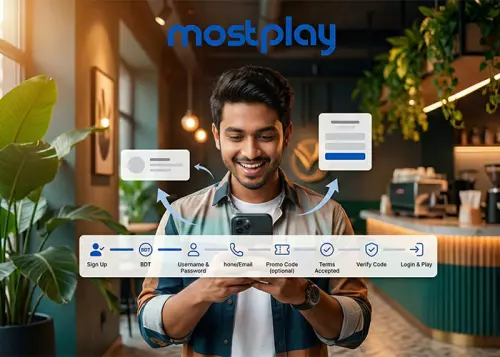
Web and app follow the same flow, with the same fields and the same confirmation step. The player can complete Most play registration online in a few minutes, and choosing BDT as the account currency keeps the wallet setup consistent from the start:
Enter a promo code only if it is valid for the account;
Accept the terms and submit;
Confirm the SMS or email code;
Go to login and sign in with the same details.
Login fails when the code was not confirmed or a different phone or email is used. Complete the code check, then sign in with the same details. If there are several entry buttons, Mostplay login registration is the main login form.
150% JILI Welcome Bonus for First Deposit
This welcome bonus boosts the first deposit for JILI Slots play. After registration, the player selects the promo during the deposit and receives a 150% match within the stated limits. The bonus can be claimed once and applies only to JILI Slots.
Parameter
Terms
Bonus type
Deposit
Bonus %
150%
Deposit range
100 BDT to 25,000 BDT
Max bonus
1,000 BDT
Wager
15x
Claim
Once
Games
JILI Slots only
To claim it, the player registers via the Mostplay app, makes a first deposit within the range, and chooses the 150% JILI First Deposit Bonus from the available promotions during checkout. After the bonus is credited, the 15x wagering must be completed in JILI Slots to meet the offer rules.
Mostplay Verification: Documents, Steps and Timeline
Verification links an account to the real owner and helps prevent withdrawal delays. A player completes it from the profile area after login by uploading an ID and a recent address document, then waiting for a review:
Log in, open the menu in the upper right, and go to Account Verification;
Check the personal details entered during registration and fix any typos;
Upload a valid photo ID, such as a passport, driver’s license, or national ID, with the name, signature, photo, and all four corners visible;
Upload proof of address, such as a bank statement or utility bill issued within the last 6 months, with all corners visible, and do not use mobile phone bills;
Submit the files and wait for the review result.
Reviews are often completed within 48 hours, but extra documents can be requested in some cases. Files are accepted as JPG or PNG, and sometimes PDF, so the player should upload sharp, high quality images to avoid processing delays.
Login and Account Recovery for Bangladesh Players
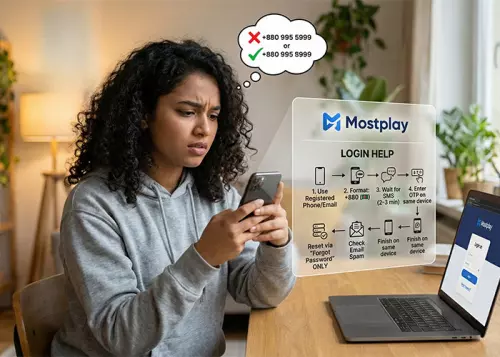
Most access issues start with using the wrong identifier or skipping a confirmation step. The safest approach is to sign in with the same phone or email used during sign up, keep the Bangladesh phone format +880, and complete any pending code check before trying again:
Open the Mostplay login page and enter the same phone number or email used during registration;
For phone login, use the +880 format and wait 2 to 3 minutes before resending an OTP;
Check the SMS inbox and enter the OTP code without switching devices mid flow;
If a password is required, reset it only through the official “Forgot Password” option;
For email recovery, check spam and promotions folders, then request a fresh reset message if nothing arrives;
Finish the reset on the same device and sign in again with the original identifier.
If login still fails, the most common causes are a typo in the phone or email, an expired OTP, or trying to recover through a different method than the one used at sign up. Keeping one identifier from sign up to reset reduces mismatches and restores access faster.
How does Mostplay registration work in Bangladesh?
It follows the same flow on web and app. The player signs up, confirms the SMS or email code, then logs in with the same phone or email used during registration.
Why does Mostplay login fail with correct details?
Most failures come from two things: the confirmation code step was never completed, or the player is trying a different identifier than the one used at sign up. Finish the code check first, then use the original phone or email.
What should a player do if the OTP does not arrive?
Wait 2 to 3 minutes before resending;
Use the +880 format for Bangladesh numbers;
Do not switch devices mid-flow;
If the code keeps failing, restart the login and request a fresh OTP.
Mostplay verification - what documents are accepted?
A valid photo ID is required to confirm the account owner. The document should be readable, with the full page visible, including all four corners:
Passport, driver’s license, or national ID;
A clear photo showing the name, signature, and portrait;
No blur, glare, or cropped edges.
Proof of address is also commonly requested to match the profile details. A bank statement or utility bill issued within the last 6 months is accepted, while mobile phone bills are often not. Files are uploaded as JPG or PNG, and sometimes PDF.
Will switching login methods void Mostplay bonuses?
It can. The safest routine is to keep one identifier from sign up to login and recovery. If a player signs up with phone, they should also use the same phone for the first login and any resets, then add email only as a backup later.